
Before you book exams
- Submit a semester request first. Online test booking only activates after you submit a semester request for the current semester.
- Book early. All exams and quizzes must be scheduled at least five (5) business days in advance.
- Requests can't be edited. If your plans change, cancel the request and submit a new one.
- Your room may change depending on the ODE Testing Center's availability.
Final exam deadlines: Final exams must be booked by the Monday of the last instructional week. Autumn 2026 finals: by 5 p.m. Monday, November 30, 2026.
How to book in the ODE portal
-
Log in to the ODE portal.
-
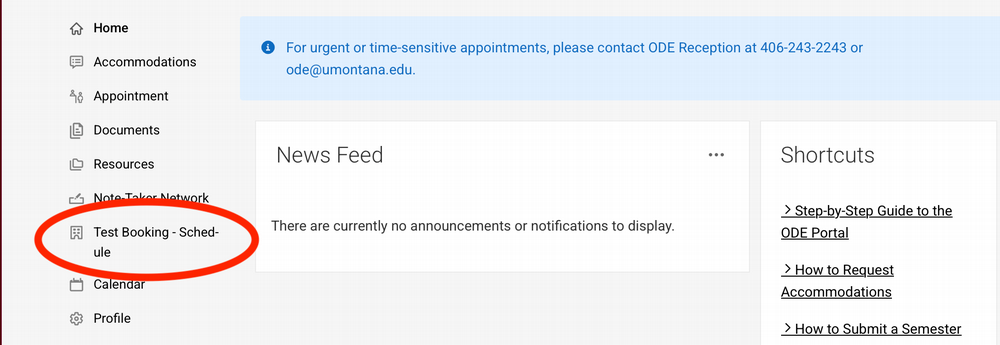
Select Test Booking – Schedule from the left-hand menu options.
-
Select New Booking Request.
-
From the Course drop-down, choose your class. Check Final Exam if this is a final.
-
Choose the exam Date, select a Space, then pick a start Time from the list.
-
Press Request to the next page.
-
Review the details. If you're approved to use additional materials allowed, list them in the Other approved testing accommodations you wish to use (FROM STUDENT) box.
-
Press Submit Request to complete.
After you submit
- ODE emails your course's faculty member to approve the request.
- You'll get an email once it's approved or denied.
- No word yet? Check your junk/spam folder, then contact the ODE Testing Center.
ODE Testing Center
Email: ode.testing@mso.umt.edu
Phone: 406-243-4216