
Research Security Training
At The University of Montana, we are committed to safeguarding the integrity of our research and ensuring compliance with federal regulations.Effective May 1, 2025, principal investigators (PIs), co-principal investigators (co-PIs), and Senior / Key personnel must complete annual Research Security Training. This requirement stems from National Security Presidential Memorandum-33 (NSPM-33) and is enacted by federal agencies.
Who Is Required to Take the Training? Research Security Training is required for PIs, Co-PIs and Senior/Key Personnel that are named in federally funded awards. This includes faculty, staff, students (graduate or undergraduate), sub-awardees, sub-recipients, faculty affiliates, fellowship researchers and contractors.
How Often is Training Required? Training is required to be completed annually. Completion dates may vary provided that no more than 12 months elapse between sessions.
How Long Does Training Take? Initial training takes about one hour. After you have taken the training once through CITI you will be able to take brief (30 minute) refresher training the following year. At this time the guidance is to alternate the full course and refresher training each year, starting with the full course.
How Do I Access the Training? The training is now accessible through CITI. Please use this CITI this step-by-step guide for help signing up for courses. Research Security can be found at question 18.
How do I get my Research Security Training certificate into Cayuse? Individuals should download and save the certificate of completion to their own file. The PI will be prompted to upload the Research Security Training Certificate, in PDF format, along with the certificates of Co-PIs and senior/key personnel, in Cayuse during Pre-Award stage. This will be the same process for NEOED or CITI.
-
If you are in one of the above categories as well as a PI, co-PI, or senior/key personnel on a federally funded award, you must complete research security training.
Training Details:
- Required annually
- Must be completed before proposal submission and annually during the period of a federal award
- Takes about 1 hour
- Available from the SECURE Center . Select “For Individual Users” and then “Viewable Version With Certificate”.
All individuals should download and save the certificate of completion to their files at the end. This certificate can be upload to Cayuse to verify completion of the course.
Please note that any UM researcher with a NETID Login must complete the research security training via NEOED.
-
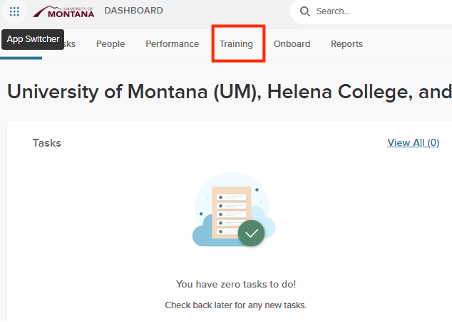
- Once you have logged into NEOED, click on the “Training” tab.
-
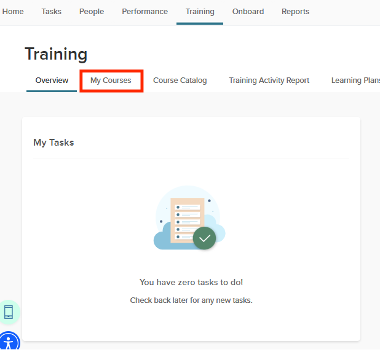
Next look for “My Courses” tab. It should be just under and left of the “Training” tab.
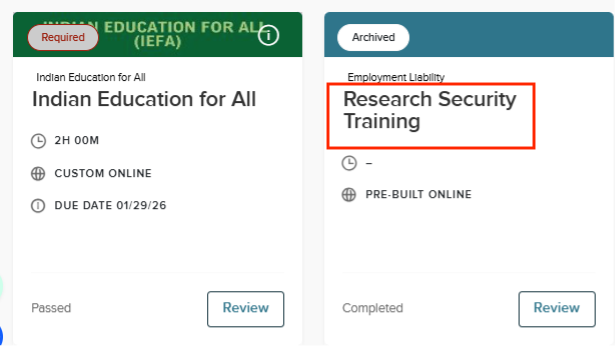
- Once you are in the “My Courses” tab, all of your courses will appear. Click on the title of the course card (highlighted) that you want print or download the certificate for.
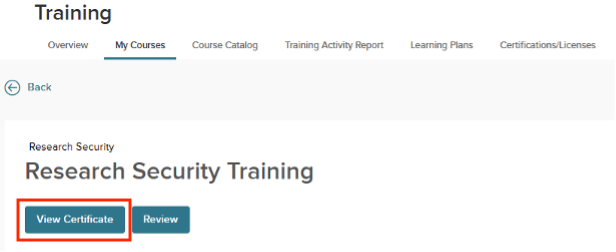
- At the next screen, click on the “View Certificate” button.
-
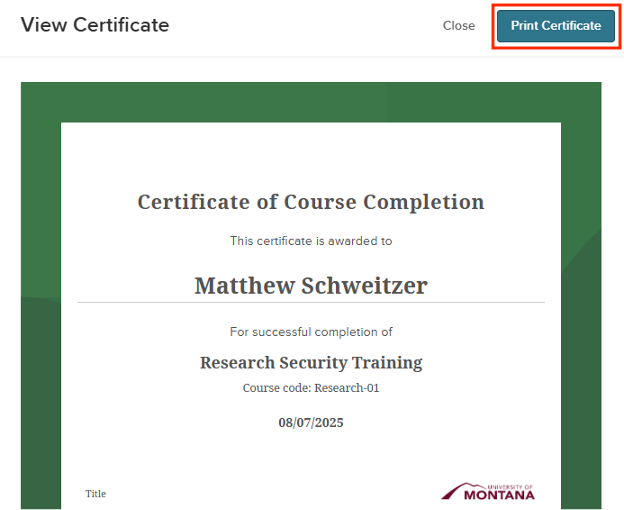
Your certificate will appear and then click on “Print Certificate” at the upper right corner.
-
A page will be generated that you can print or save the certificate.
- Once you have logged into NEOED, click on the “Training” tab.
Have questions? Contact the Research Security Office @ researchsecurity@umontana.edu