
Note taking accommodations
Students who experience barriers to capturing lecture content may qualify for note taking accommodations. These accommodations provide supplemental information to fill gaps in a student’s own notes. They are meant to support learning and not replace class attendance.
The Office for Disability Equity (ODE) offers several options. We start with note taking technology and, when technology is not an effective solution, we help arrange a note taker.
Technology-based note taking support
Audio recording of lectures with Genio
Students approved for recording lectures as part of note taking accommodations may use Genio note taking software. Genio allows you to capture lecture content and revisit it at your own pace. Authorization from ODE is required before you begin. To get set up, contact your access consultant.
Learn more on the Audio recording lectures page.
Other note taking apps
The following apps are available for you to use at your discretion. Some are free; others require a paid subscription.
- Microsoft OneNote - included with Microsoft Office 365, which the University of Montana provides at no cost to currently enrolled students.
- Evernote - Free and paid plans available.
- Notability - Compatible with Mac and iOS devices.
Note takers
When technology does not provide an effective solution, ODE can arrange for a note taker - a student in your course who volunteers to share their notes with you. This support is available to students who have been approved for note taking accommodations.
How to request a note taker
Students may independently identify a note taker or seek assistance from ODE. If a note taker cannot be designated, the student or ODE may request assistance from the faculty.
There are three ways to arrange a note taker:
- Arrange it yourself. Ask a classmate to share notes with you.
- Request ODE assistance. Email ode.notes@umontana.edu with your name, your student ID, and the course name(s) and section(s). Then, ODE will contact students enrolled in your course to recruit a note taker on your behalf. Once a note taker is designated, ODE will email you instructions for accessing the shared notes through the Note Taker Network in the ODE portal.
- Ask your instructor. Some faculty assign student note takers in their classes. Ask your instructor to connect you with one.
Accessing shared notes through ODE Portal
How you gain access depends on how your note taker was arranged.
If ODE assigns a note taker
You will receive an email with instructions for accessing shared notes. After you log in to the ODE portal, select Note Taker Network from the menu on the left side of the screen.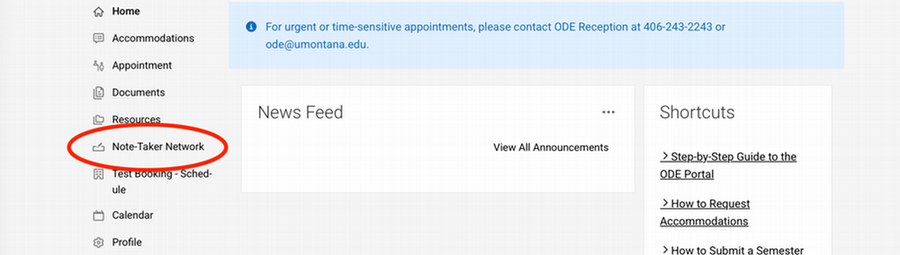
If you or your professor identified a note taker
Email ode.notes@umontana.edu to request that your portal account be activated. Include the following details:
- Your full name
- Your student ID number
- Your note taker’s full name and student ID
- The course name and section
Changing or reporting a problem with your note taker
Email ode.notes@umontana.edu to let ODE know if:
- You no longer need a note taker, or
- The notes you are receiving are consistently unusable or ineffective.
ODE will work with you to resolve the issue or arrange a new note taker.
For note takers
Sharing your notes supports your fellow classmate, and ODE recognizes that contribution.
Recognition for note takers
At the end of the semester, ODE offers monetary recognition for volunteer note taking:
-
$50 for one course
-
$100 for two or more courses
Amounts are prorated based on the portion of the semester for which notes were provided.
To receive this recognition, note takers must start the required HR paperwork at the beginning of the semester. For details, visit the Note takers page or contact ODE at ode.notes@umontana.edu.