
Registration PINs in Navigate
Your advisor may have released your PIN through the Navigate app as a convenience for you. Please note that some advisors may use email or other means to release a PIN to you and some student groups such as postbaccalaureates do not need PINs to register.
What is a PIN?
Your PIN allows you to register on your own for sections once registration begins.
PINs can start being used during Priority Registration
Every semester, time is set aside specifically for continuing students to make their course selections ahead of incoming students in the form of a time ticket within a Priority Registration window. To make sure you are able to register for the courses you are most interested in, please take advantage of Priority Registration.
To view when registration opens and for instructions on how to view your time ticket in Griz Portal, please visit https://www.umt.edu/registrar/registration/time-tickets.php.
How to view your PIN if your advisor released it in Navigate
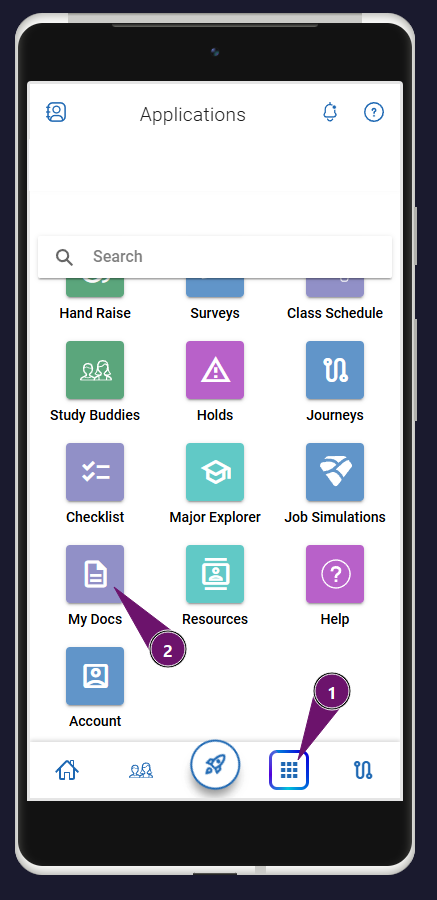
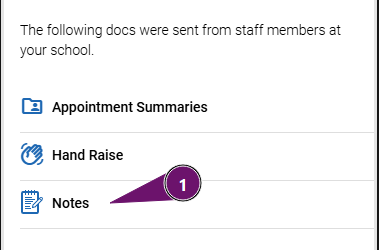
PINs released in Navigate can be found in the Navigate mobile app within the My Docs folder under the Notes section. Your advisor may have also released your PIN to you through an email or other means. You might need to meet with your advisor before they release your PIN depending on the program or where you are at within the program progression. Please check with your advisor for details on their PIN release practices if needed.
IF your advisor used Navigate as a convenient way to give your your PIN, you will need the Navigate app which is available as a mobile app (Android or Apple) or as a web app. You can login using the Duo app with your NetID.
Once in the student app, you can find your PIN by browsing to the My Docs area.
1. Within the Navigate mobile app, you will want to select the menu icon at the bottom (nine squares) and then choose the My Docs menu item from the list. The web version of Navigate will have the My Docs menu item on the home screen.
2. Within the My Docs area, you can select the Notes item.
3. Select the most recent note titled “Registration PIN” to view your PIN for the upcoming semester.