
Incomplete Grades
The University of Montana uses the incomplete (I) grade as a placeholder for students receiving extensions.
In the event of extenuating circumstances, an instructor may grant an incomplete when there is a reasonable probability that the student can finish the course without retaking it.
Not sure whether to assign an N or I? Double check the N versus I rule of thumb.
Guidelines
- The student was passing for the majority of the semester.
- The student faced extenuating circumstances preventing them from finishing the class on time.
- The student has agreed to the conditions of the extension set by the instructor.
- There is a reasonable likelihood that the student will complete the remaining coursework without needing to retake the class.
Instructor process
- Before you begin:
- See how to avoid the two most common errors.
- Conditions:
- Set conditions for your student to finish the incomplete, including deadlines and coursework required.
- Department chair:
- Communicate these conditions to your department chair or office.
- Enter grade:
- Follow the step-by-step instructions for tips to prevent technical difficulties when entering the incomplete grade.
- Canvas access:
- The student should not reregister for the course unless they end up retaking it. If needed, submit a Student Incomplete in Canvas request to keep the student's access in Canvas open beyond 11:59 p.m. of the last day of finals.
- Update grade:
- Upon completion, request a grade change. The completed grade appears as an I followed by the final grade (e.g. IA, IB, IC, ICR etc.)
- Unfinished incomplete:
- If the incomplete is not updated by the extension deadline, the alternate grade gets posted to the student's transcript.
Incomplete final grade (aka alternate grade)
What's this?
- Backup grade in case work is not finished by the extension deadline
- Student's current standing including any zeroes for missing work
- Not the anticipated grade they will earn upon completion
Last date of attendance
Pay special attention to attendance dates as they are subject to federal regulations.
Review the most up-to-date guidelines for what counts as "attendance" both online and in person.
Key considerations:
- Student must have attended the majority of the semester.
- Incompletes generally shouldn't be issued to students who stopped attending early in the semester.
How to assign an I in GrizPortal
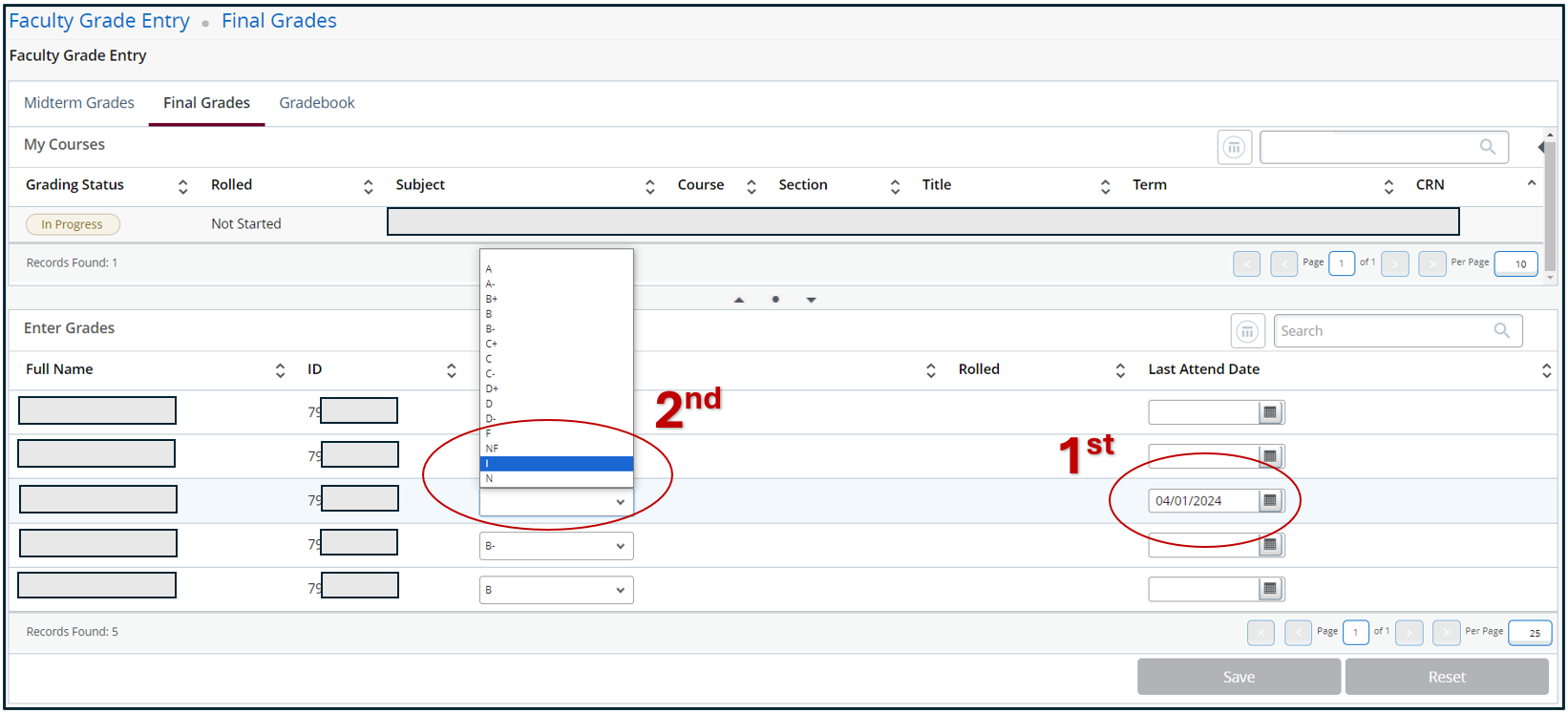
The #1 tip: Follow this order of operations to circumvent technical difficulties in GrizPortal.
- Last date of attendance
- Enter I grade
- Alternate grade
- Extension deadline
-
Step One: Last Date of Attendance
Before selecting the I grade, first provide the student's last date of attendance.
If you enter the I first, it will switch you to the "Incomplete Grades" tab before you have the chance to provide the last date of attendance.
Step Two: Enter an I
Select I in the final grade column.
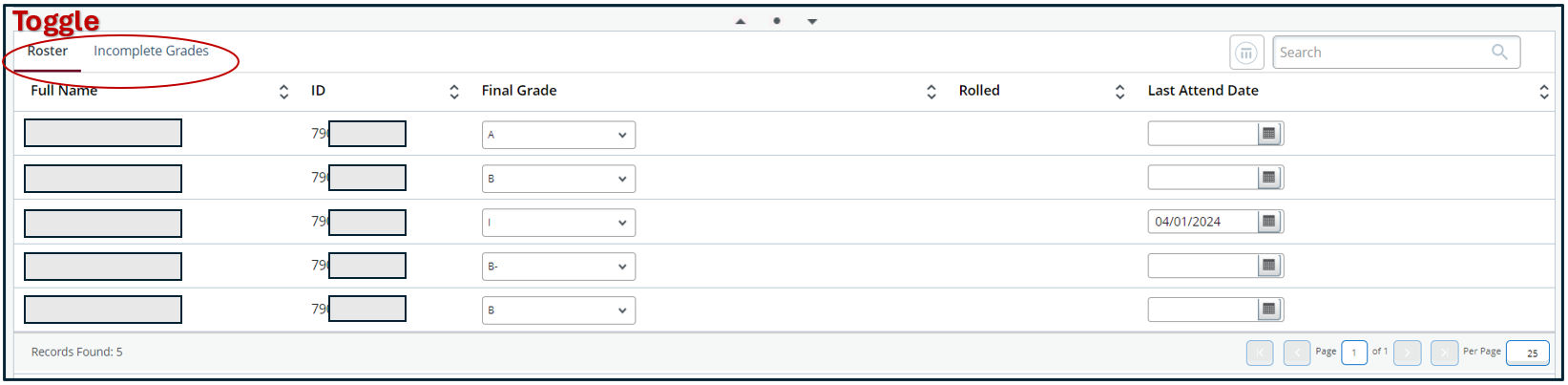
Your screen will automatically switch from the "Roster" tab to the "Incomplete Grades" tab to complete the remaining steps.
Step Three: Alternate Grade
Provide the student's "incomplete final grade" (aka alternate grade), which is their current grade in the class should no further work is completed.

Step Four: Extension Date
The maximum extension deadline is approximately one year from the time of grade entry. This is the default value, but you may adjust the deadline within that year as you see fit.

Step Five: Repeat
Repeat steps one through four for each incomplete by toggling back to the "Roster" tab.
Step Five: Change Grade Upon Completion
Request a grade change once the student has completed their outstanding work.
If the extension deadline you set in step four has passed, the alternate grade will be posted to the student's transcript and will require department chair or dean approval to modify.